
開發者的 Google Routes API 實戰指南

大家都知道,可以用 Google Maps Routes API 在地圖上建立兩個地點之間的路線。但你可能未必知道,它其實可以做到更多功能,例如:
1. 計算包含即時交通狀況的行車時間與 ETA(預計到達時間)
2. 取得逐步導航指示(Turn-by-Turn Directions)
3. 避開收費公路(Tolls)
4. 為汽車、步行、公共交通或單車路線規劃多個途經點(Waypoints)
5. 尋找最近的可用的士或車輛
6. 在路線沿途搜尋興趣地點(POI),例如油站、休息站或公廁

1️⃣ 開發者的 Google Routes API 指南(本文)
2️⃣ 使用 Routes API 規劃多個途經點路線
3️⃣ 利用 Google Distance Matrix API 進行的士調度
4️⃣ 使用 Google Maps 的「沿途搜尋(Search Along Route)」功能
5️⃣ 如何在 Android 上用 Routes API 繪製 Google Maps 路線
在這五篇文章中,我會介紹三個主要端點(Endpoints):
- Compute Routes
- Compute Route Matrix(兩者皆屬於 Routes API)
- Search Along Route(屬於 Places API)
我會說明它們的用途、常見場景、收費方式,最後每篇都附上實際示範及可運行的程式碼,方便你直接應用在項目中。






什麼是 Google Routes API?
Routes API 係一組 API 嘅統稱,用嚟幫你搵由 A 點到 B 點 的最快路線。佢取代咗以前極受歡迎而已經停用嘅 Directions API。如果你有用過 Google Maps App,你已經對佢嘅功能相當熟悉。
Routes API 主要包括三個端點(endpoints):
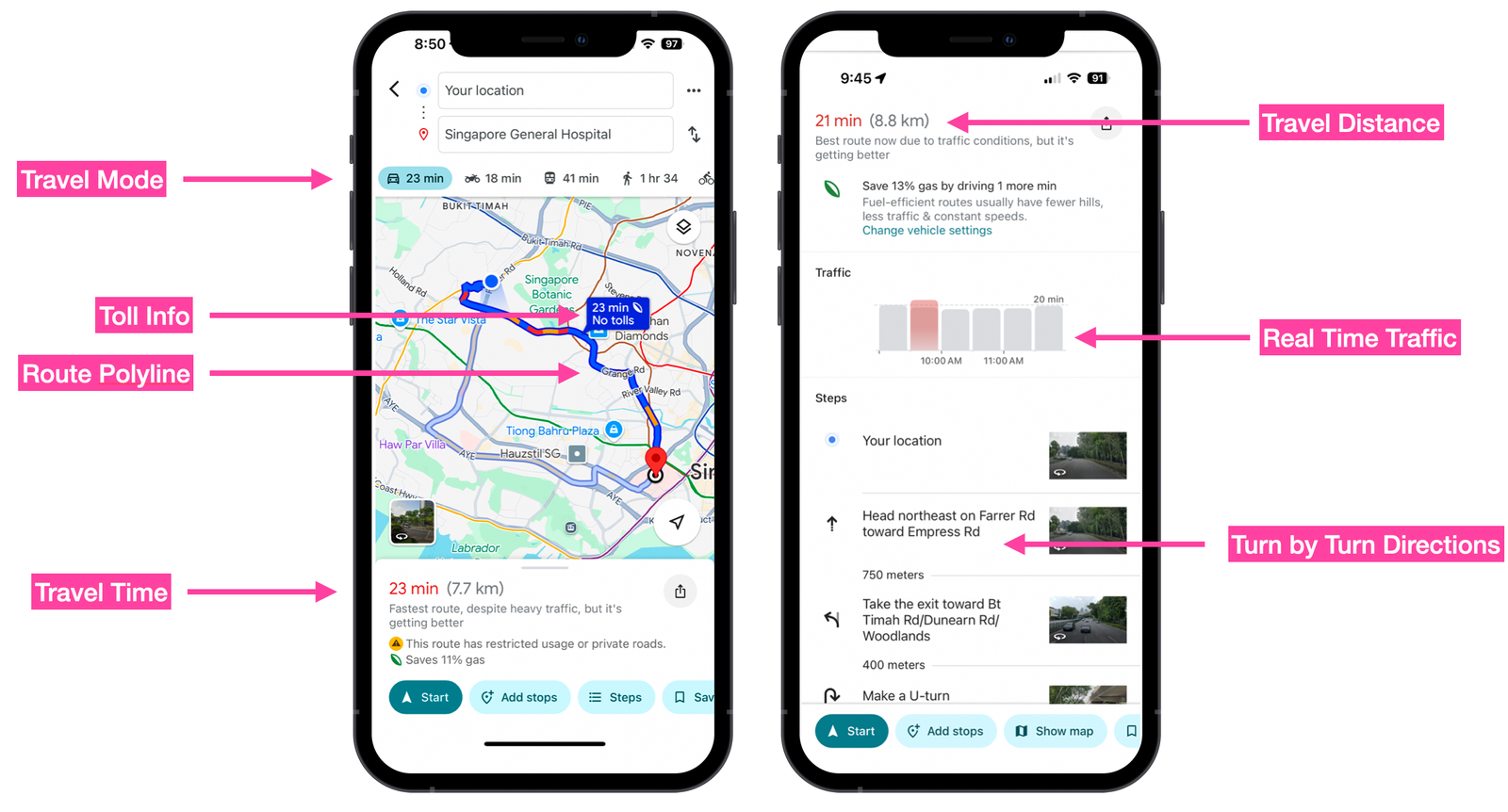
1. Compute Routes 係一個支援多個中途站(multi-waypoint)的路線規劃 API,提供以下功能:
- 預估行程時間(ETA)
- 駕駛距離
- 逐步導航指示(Turn-by-turn Directions)
- 即時交通狀況
佢被 Google Maps 用來計算點對點的行程時間及距離,當你使用 Google Maps 導航時,就會用到這個端點。
2. Compute Route Matrix
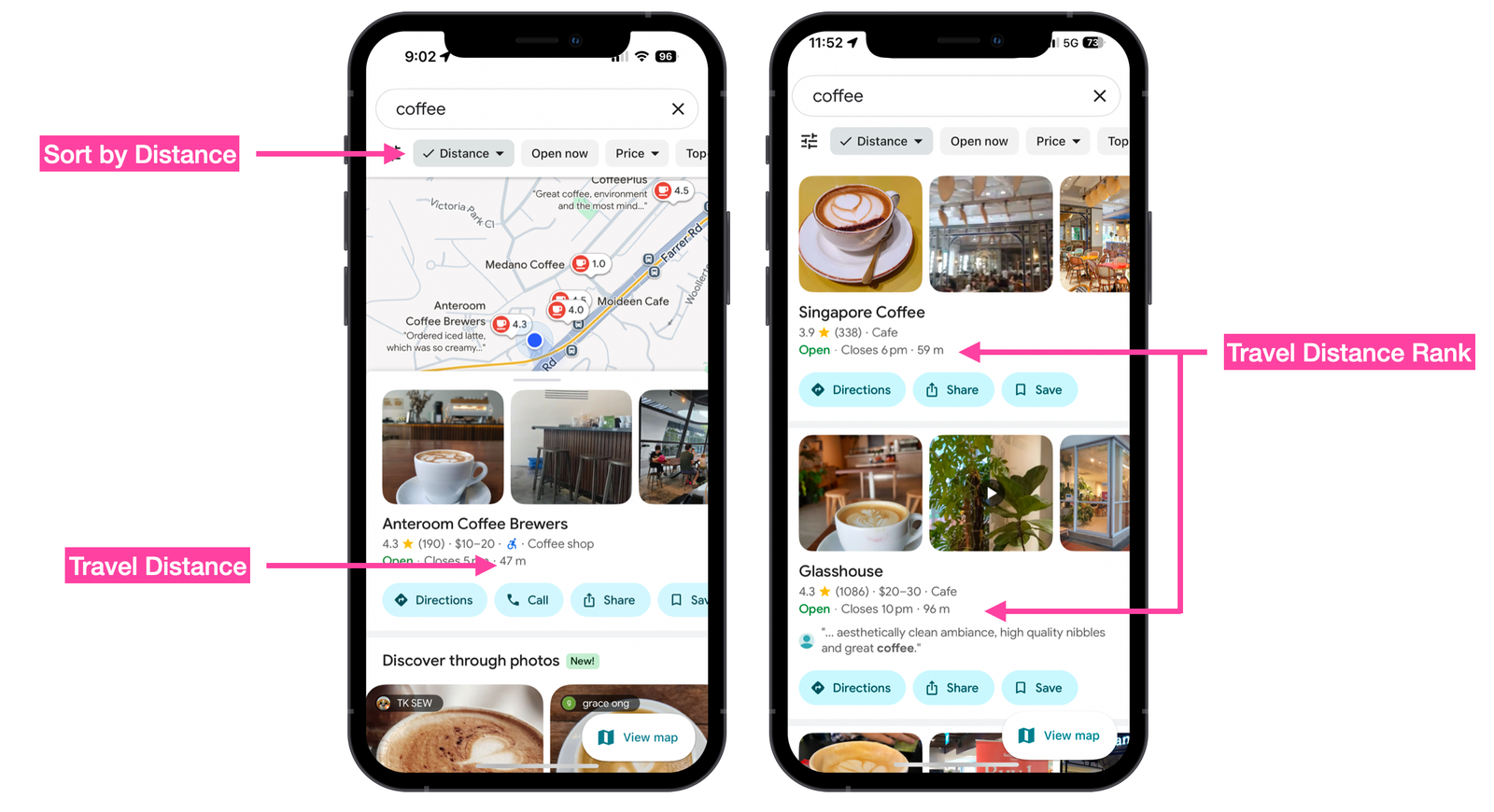
Compute Route Matrix 係一個 距離矩陣(distance matrix)API,可以提供多個起點(origins)與目的地(destinations)之間的行程距離與時間。
Google Maps 會使用呢個 API 來 根據使用者當前位置 排序搜尋結果,例如找出最近的商家或服務。
3. Search Along Route
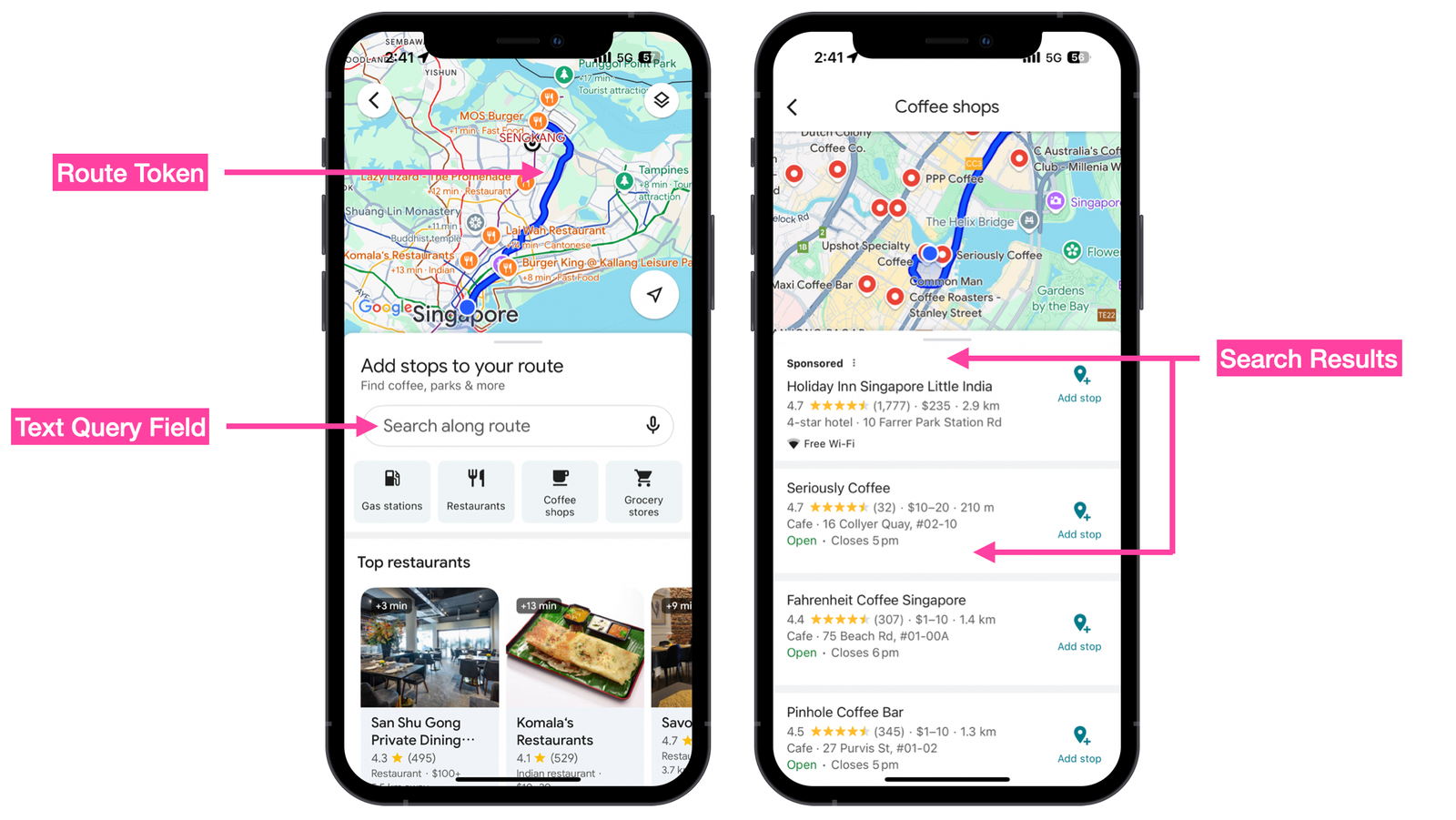
Search Along Route 會使用 Routes API 回傳嘅 encoded polyline 來進行 Places Text Search,找出沿路嘅商家或景點。
呢個功能最常用喺 Car Play 情境下,例如你已經喺 Google Maps App 裡面規劃好一條路線,想喺途中搵餐廳、咖啡店或者休息站。
Google Routes API 範例
呢個就係 Google 使用 Routes API 嘅方法,你可以用佢做以下事情。
使用 Compute Routes 端點
端點(Endpoint):
POST https://routes.googleapis.com/directions/v2:computeRoutes
Headers:
Content-Type: application/json; charset=utf-8
X-Goog-Api-Key: YOUR_API_KEY
X-Goog-FieldMask: routes.duration,routes.distanceMeters,routes.polyline,routes.legs,routes.travelAdvisory.tollInfo,routes.legs.travelAdvisory.tollInfo,routes.travelAdvisory.speedReadingIntervals
Body:
{
	"origin": {
		"location": {
			"latLng": {
				"latitude": 49.1951165,
				"longitude": -123.1814285
			}
		}
	},
	"destination": {
		"location": {
			"latLng": {
				"latitude": 50.1042288,
				"longitude": -123.0840866
			}
		}
	},
	"travelMode": "DRIVE",
	"polylineQuality": "OVERVIEW",
    "routingPreference": "TRAFFIC_AWARE",
	"departureTime": "2025-10-23T15:00:00Z"
}
回應 (Response):
在地圖上繪製路線(Draw a Route on a Map)
Compute Routes 端點回傳嘅 polyline.encodedPolyline 欄位,可以輕鬆地畫喺 Google Map 上:
- 使用 <Polyline/> 元件直接繪製
- 或者用 polyline 解碼器 將編碼還原成原始的經緯度座標(latitude 和 longitude),畫出每個路線點
這樣,你就可以在地圖上呈現完整路線,並且結合即時交通資訊或其他視覺效果。
{
    "polyline": {
        "encodedPolyline": "iggkHlrynVr@j@h@L~C`@b@ERKRYt@iBR{@Hw@FgBHcCRkCt@qNAuAe@mG{BoWW{FEkFDsp@@aTIcHU{Gi@uJESW}CqGqk@gBwPe@oCi@eBi@wAsA_Cq@y@o@m@}Aw@iF_BqBk@}EqAuBs@MQeG_CcAMo@@k@Ns@j@e@l@_@z@aCfJ{AhGS^_@~A}@dDa@z@_@`@gAb@OJuFGMMsDMaIISHGHidAqAwm@{@o\\]uCBeEK{DIq_@e@wGGq_@a@oKKyd@o@ek@s@sJE}HKUQ{JO_AMwAa@s@]"
    }
}取得逐步導航指示(Turn-by-Turn Directions)
如果你需要 列印逐步導航指示 或 在 App 中顯示,可以使用 Compute Routes 回傳結果中 steps[] 陣列裡的 navigationInstruction.instructions 欄位。
這個欄位會提供每一步的詳細行駛指示,例如「向左轉」、「直行 200 公尺」等。
{
    "steps": [
        {
            "navigationInstruction": {
                "maneuver": "DEPART",
                "instructions": "Head southwest on Grant McConachie Wy E"
            }
        }
    ]
}
取得考慮即時交通的路線距離與行程時間
Compute Routes 端點的回應包含以下欄位:
- legs.distanceMeters:路段距離
- legs.duration:行程時間
要計算到達目的地的 ETA(預計到達時間),只需將 legs.duration 加到當前時間即可。
{
    "routes": [
        {
            "legs": [
                {
                    "distanceMeters": 130429,
                    "duration": "7812s"
                }
            ]
        }
    ]
}
使用 Compute Route Matrix 端點
端點(Endpoint):
POST https://routes.googleapis.com/directions/v2:computeRoutes
Headers:
Content-Type: application/json; charset=utf-8
X-Goog-Api-Key: YOUR_API_KEY
X-Goog-FieldMask: routes.duration,routes.distanceMeters
Body:
{
    "origins": [
        {
            "waypoint": {
                "location": {
                    "latLng": {
                        "latitude": 49.2682989,
                        "longitude": -123.1830924
                    }
                }
            }
        }
    ],
    "destinations": [
        {
            "waypoint": {
                "location": {
                    "latLng": {
                        "latitude": 49.254563,
                        "longitude": -123.1121977
                    }
                }
            }
        },
        {
            "waypoint": {
                "location": {
                    "latLng": {
                        "latitude": 49.3137275,
                        "longitude": -123.0540365
                    }
                }
            }
        },
        {
            "waypoint": {
                "location": {
                    "latLng": {
                        "latitude": 49.2351204,
                        "longitude": -123.1692661
                    }
                }
            }
        }
    ],
    "travelMode": "DRIVE",
    "routingPreference": "TRAFFIC_AWARE",
    "departureTime": "2025-10-23T15:00:00Z"
}
回應 (Response):
多目的地距離與行程時間
與其多次呼叫 Compute Routes 端點去計算多個目的地的距離和行程時間,Compute Route Matrix 可以一次性回傳多個目的地的 distanceMeters(距離)和 duration(時間)。
呢個端點通常應用於 共乘(ride-sharing)平台 的派車演算法,用來快速找到並指派距離乘客最近的司機。
[
    {
        "destinationIndex": 2,
        "status": {},
        "distanceMeters": 4827,
        "duration": "558s"
    },
    {
        "destinationIndex": 1,
        "status": {},
        "distanceMeters": 18993,
        "duration": "1774s"
    }
]
Google Directions API vs Routes API
如果你係長期使用 Google Maps Platform 嘅開發者,可能已經用緊 Directions API 來建立路線或者計算 ETA(預計到達時間)。但係,值得唔值得升級去 Routes API(Directions API 每千次請求 $8 CPM,而 Routes API 每千次 $10–$15 CPM)呢?
我嘅答案係 值得,但前提係你需要以下功能:
即時交通 Polyline(Real-Time Traffic Polylines)
Routes API 可以返回 彩色 polyline,並動態反映 即時交通狀況。通過解析回應中的 travelAdvisory.speedReadingIntervals,你可以向用戶提供沿路交通流量及擁堵情況的可視化呈現。
{
    "speedReadingIntervals": [
        {
            "endPolylinePointIndex": 13,
            "speed": "NORMAL"
        },
        {
            "startPolylinePointIndex": 13,
            "endPolylinePointIndex": 15,
            "speed": "SLOW"
        }
    ]
}
兩輪車路線(Two-Wheeler Routing)
像 雅加達(Jakarta)、馬尼拉(Manilla) 同 胡志明市(Ho Chi Minh City) 呢啲城市,交通擠塞問題好嚴重。
喺呢啲城市,使用 摩托車(motorcycle) 或 電單車/輕便車(scooter) 可以有效避開擠塞,因為呢啲車輛可以走側街,較容易繞過擁堵路段,比起汽車或大型車輛更靈活。
Routes API 允許你將 travelMode 設定為 "TWO_WHEELER",從而考慮兩輪車特有嘅行駛速度同路線特性。
{
    "origin": {
        "location": {
            "latLng": {
                "latitude": 10.8108786,
                "longitude": 106.482072
            }
        }
    },
    "destination": {
        "location": {
            "latLng": {
                "latitude": 10.4034969,
                "longitude": 107.0404779
            }
        }
    },
    "travelMode": "TWO_WHEELER",
    "polylineQuality": "OVERVIEW",
    "departureTime": "2025-10-23T15:00:00Z"
}
收費公路資料(Toll Data)
喺向用戶提供路線時,考慮沿途嘅 收費費用(toll fees) 非常重要。尤其係喺 物流(logistics) 或 最後一哩配送(last mile delivery) 等行業,每一分成本都好重要。
路線物件(route object)入面嘅 travelAdvisory.tollInfo 會提供沿途收費嘅估算值,並以 當地貨幣(local currency)。
{
    "travelAdvisory": {
        "tollInfo": {
            "estimatedPrice": [
                {
                    "currencyCode": "USD",
                    "units": "8",
                    "nanos": 800000000
                }
            ]
        }
    }
你甚至可以要求 Routes API 回傳 避開收費公路(avoid tolls) 的路線,只需喺請求中加入 avoid Tolls 參數即可。
{
    "routeModifiers": {
        "avoidTolls": true,
        "avoidHighways": true
    }
}Google Routes API 金鑰設定
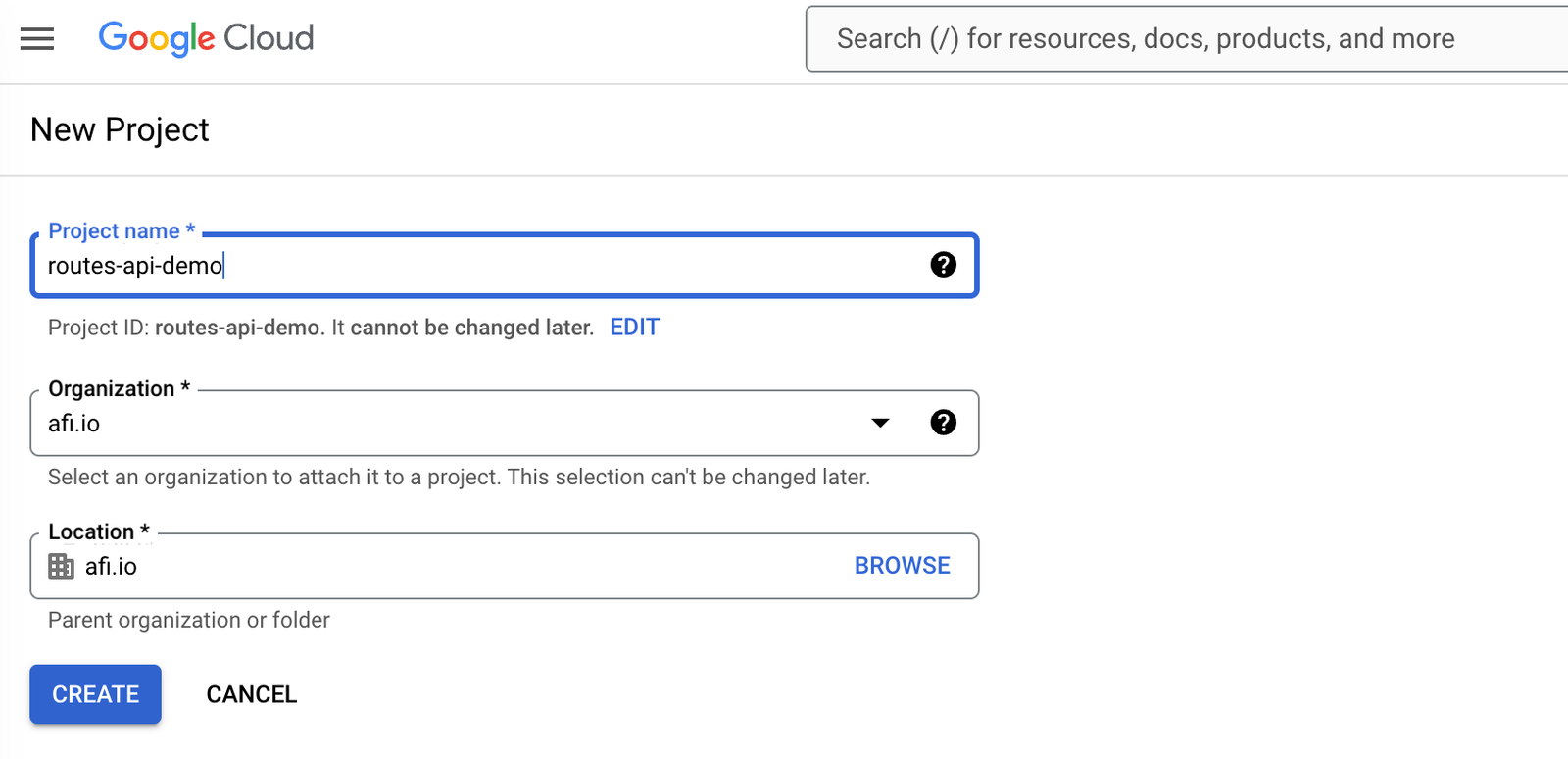
要開始使用 Google Routes API,你首先需要喺 Google Cloud Console 裡面設定. 打開 Google Cloud Console. 從控制台(Dashboard)建立一個新專案,命名為 routes-api-demo 按 [CREATE] 完成專案建立.
啟用 Google Routes API 喺左側選單入面,揀選 APIs & Services 頁面 點擊 [+ Enable APIs and Services] 搜尋 "Routes API",然後啟用.
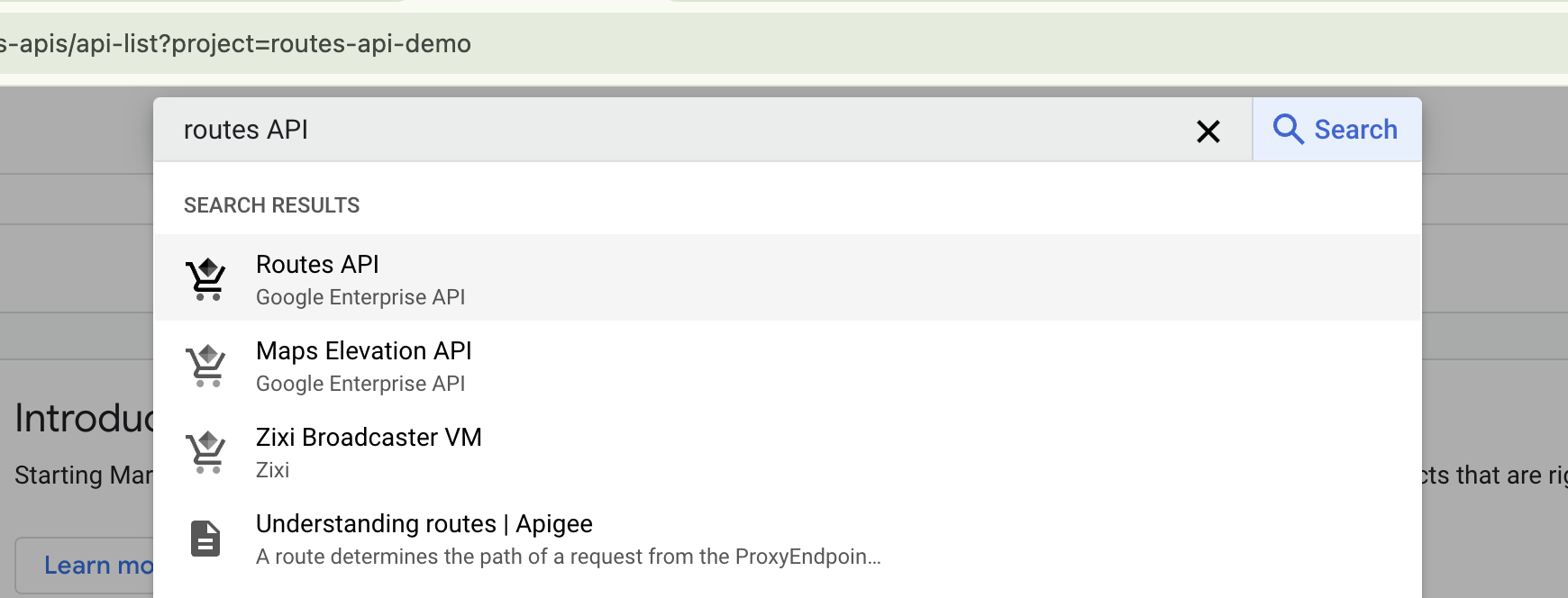
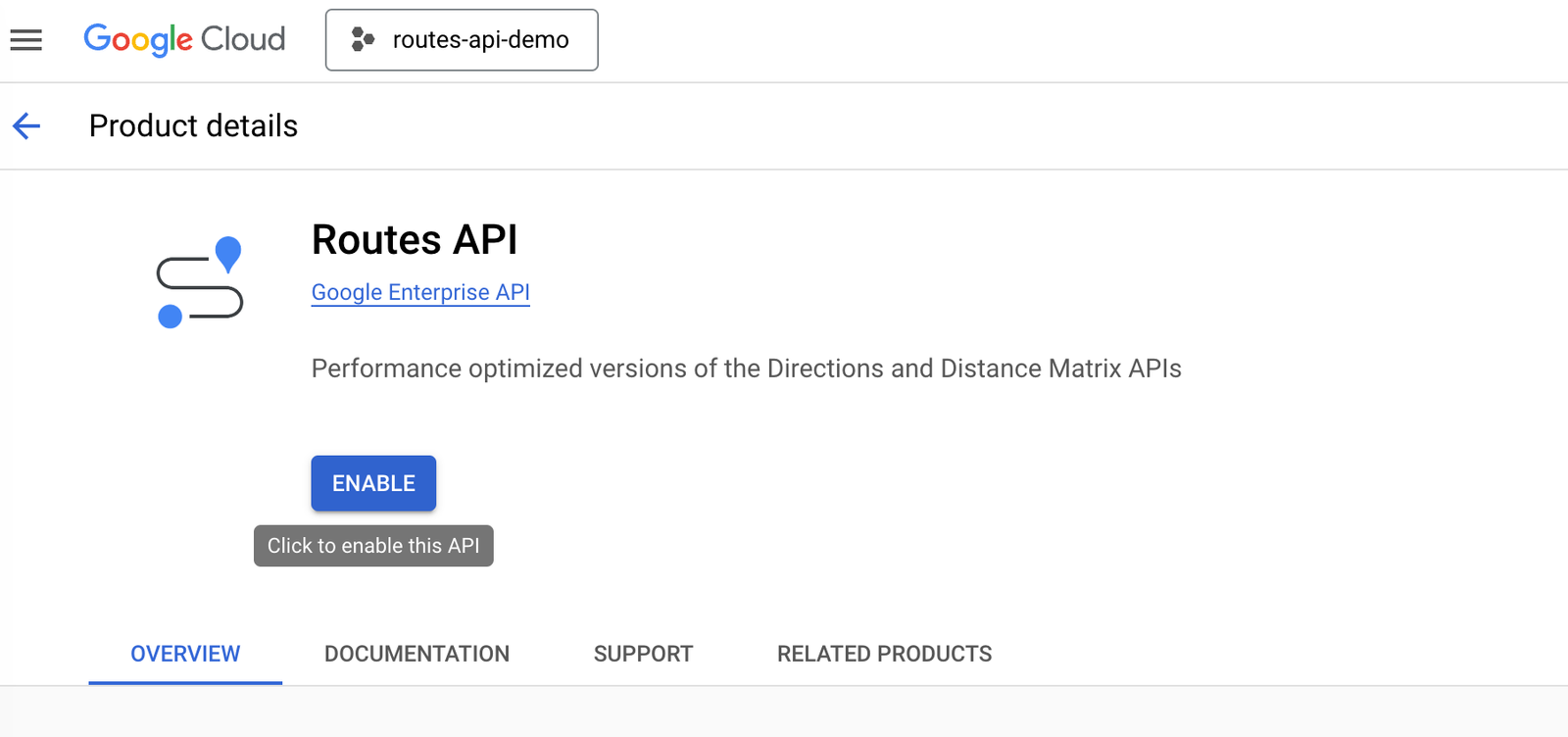
點擊 [Routes API] 連結,然後按 [Enable] 按鈕啟用
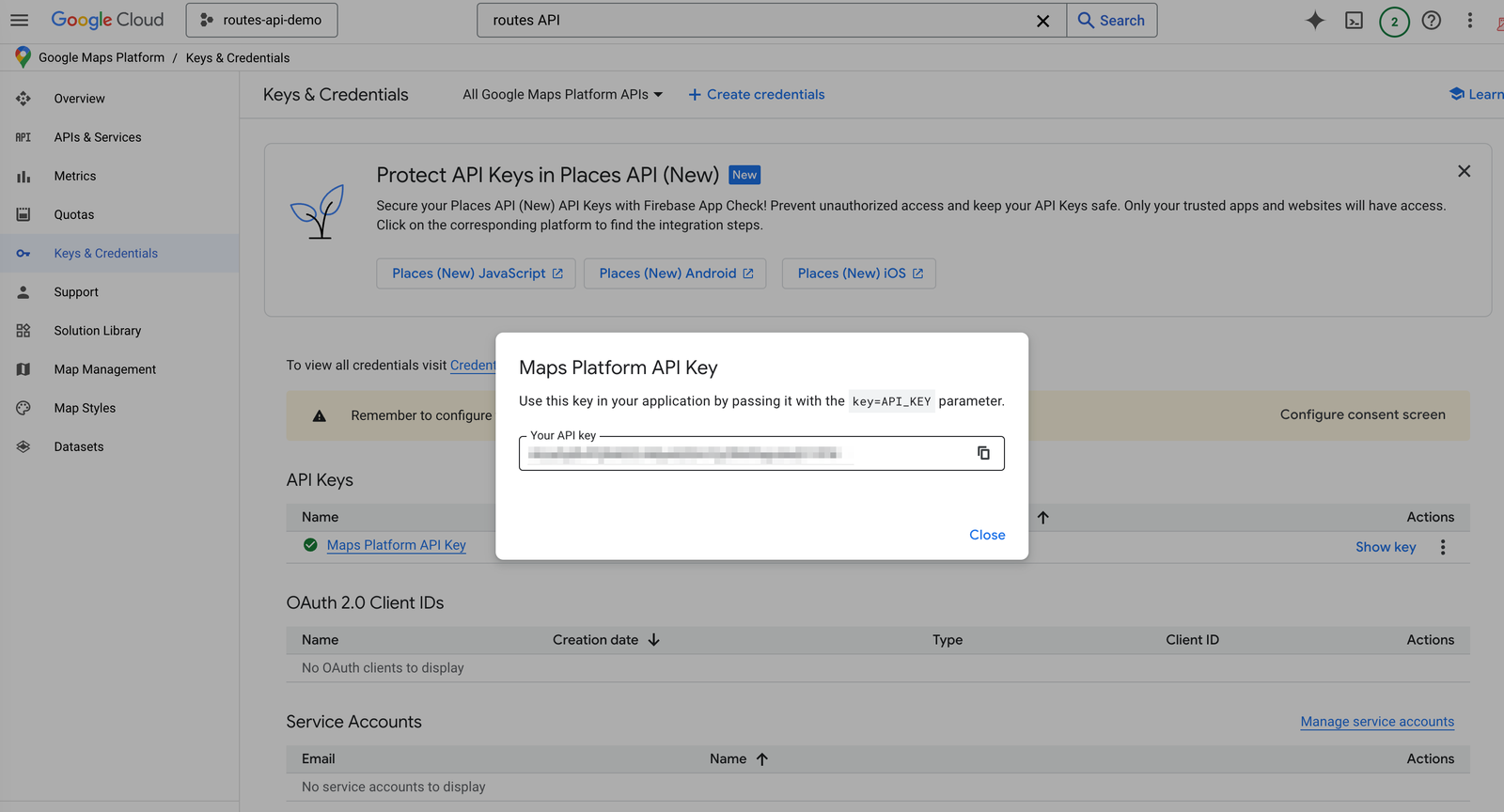
點擊 [Save] 儲存設定. 如果你返回 Keys and Credentials 頁面,可以喺右邊點擊 [Show Key] 來查看你嘅新 API Key.
Google Routes API 定價
同其他 Google Maps Platform API 一樣,Routes API 採用 按使用量計費(pay-as-you-go) 模式。無論係 Compute Routes 定 Compute Route Matrix 端點,都有三個定價層級:
- 基本版(Basic):$5 CPM(每千次請求成本)
- 進階版(Advanced):$10 CPM
- 高級版(Preferred):$15 CPM
API 呼叫落喺邊個層級,取決於你喺 X-Goog-FieldMask header 入面包含嘅欄位。
Routes API 不同級別介紹
基本版(Basic):呢個版本嘅 Routes API 用法同舊有嘅 Directions API 幾乎一樣。佢可以提供由起點(origin)到目的地(destination)嘅基本路線資料,並且支援最多 10 個中途站(intermediate waypoints)。
進階版(Advanced):進階層級支援 11 至 25 個中途站,同時引入咗 即時交通資料(real-time traffic information),仲可以設定額外參數例如:
- Side of the road(行車方向一側)
- Heading(前進方向)
- Vehicle stopover(車輛停留點)
高級版(Preferred):最高層級包含晒前兩個層級嘅所有功能,仲額外支援:
- 兩輪車路線(Two-wheeled vehicle routing)
- 收費公路費用計算(Toll calculation)
- Polyline 上顯示交通資訊(Traffic info on polylines)
例如,如果你喺請求入面要求攞到 routes.travelAdvisory.tollInfo 嘅資料,只要喺 X-Goog-FieldMask header 入面加入相關欄位,就會自動以 Routes API(Preferred)SKU 嘅 $15 CPM(每千次請求成本) 價格計費。
本系列教學嘅下一步
完成成個教學系列之後,你會成為整合 Google 高階路線功能嘅專家。具體嚟講,我會教你點樣:
- 喺 Google Map 上畫出帶交通資訊嘅 polyline;
- 攞取會考慮即時交通情況嘅行程時間同距離;
- 用 Field Mask 指定你要嘅資料欄位,確保只攞到你真正需要、而且會影響收費嘅內容;
- 用 Distance Matrix API 搵出附近車輛;
- 生成 Route Token,用嚟交畀 Google Navigation SDK 或 Google Text Search API 作進一步運算。
👋 一如以往,如果你有任何問題或者意見,歡迎喺 LinkedIn 搵我傾下!