
GMPRO docs: Squash durations and parking
How to model "park once, deliver multiple" scenarios using transition attributes and squashed durations with GMPRO.


When calculating how many jobs a driver can do in a day, route optimization engines such as the Google Maps Platform Route Optimization API (GMPRO) generally consider three key factors: the travel time between stops, the driver’s available working time, and the service time required at each stop. Typically, each stop might have a service time of say 10 minutes to account for parking and finding the entrance. But if a driver has six stops within the same building, it shouldn’t take 6 × 10 minutes (60 minutes) in total.
The route optimization solver should squash durations by adding a one-time parking duration to each group of deliveries at the same building, while applying separate service times for each individual delivery. In this blog post, I’ll show you how to use GMPRO's transition_attributes property to do this and accurately model parking time for multiple deliveries within the same building.

Part 1: GMPRO: Google Maps Platform route optimization API
Part 2: GMPRO TSP solver: Google Maps with more than 25 waypoints
Part 3: Google Maps route optimization: multi vehicle
Part 4: GMPRO fleet routing app - free route planner for multiple stops
Part 5: GMPRO docs: Fixed vehicle costs
Part 6: GMPRO docs: Territory optimization and route planning
Part 7: GMPRO docs: Solving the VRP with route clustering and soft constraints
Part 8: GMPRO docs: Driver load balancing with soft constraints
Part 9: GMPRO docs: Driver breaks
Part 10: GMPRO docs: Complete deliveries before pickups in cargo bike logistics
Part 11: GMPRO docs: Force stop sequences using precedence rules
Part 12: GMPRO docs: Cut cost / raise care with smart NEMT routing
Part 13: GMPRO docs: Routing for Demand Responsive Transport
Part 14: GMPRO docs: Squash durations and parking (this article)
Parking and typical driver workflows
It might seem simple, but to understand how GMPRO handles parking, we first need to look at how drivers actually run their routes. At the beginning of a shift, a driver is usually given a list of stops. This list might already be optimized using a tool like GMPRO - or it might be unordered, leaving the driver to plan the route manually.
The driver leaves the depot with a van full of packages and heads to the first stop - an apartment building with three deliveries. He unloads the packages for that building onto a trolley or hand cart, then visits each unit to drop off the packages at the door. Once all deliveries are made, he returns to his vehicle and drives to the next stop.
Modeling the driver's route with transition attributes
Before we look at how to use transition attributes to account for parking in GMPRO, we first need to understand what a transition is and the role it plays in breaking a route into its individual components.
The transitions field in the GMPRO response output describes the movements between stops on a vehicle's route - essentially, the "legs" of the journey between two consecutive locations, or visits. For example, if you have two visits yvr789 and yvr987 at two different locations:
{
    "visits": [
        {
            "shipmentIndex": 1,
            "startTime": "2024-07-08T16:15:06Z",
            "detour": "0s",
            "shipmentLabel": "yvr789",
            "loadDemands": {
                "weight": {
                    "amount": "-1"
                }
            }
        },
        {
            "shipmentIndex": 2,
            "startTime": "2024-07-08T16:34:25Z",
            "detour": "940s",
            "shipmentLabel": "yvr987",
            "loadDemands": {
                "weight": {
                    "amount": "-1"
                }
            }
        }
    ]
}
The output will include three transitions to represent the full journey: one from the start location to the first visit, one between the first (index 0) and second visits, and one from the second visit (index 1) to the end location (if one is specified). In general, if there are n visits, there are always n+1 transitions.
{
    "transitions": [
        {
            "travelDuration": "906s",
            "travelDistanceMeters": 9746,
            "waitDuration": "0s",
            "totalDuration": "906s",
            "startTime": "2024-07-08T16:00:00Z",
            "vehicleLoads": {
                "weight": {
                    "amount": "4"
                }
            }
        },
        {
            "travelDuration": "737s",
            "travelDistanceMeters": 9965,
            "delayDuration": "300s",
            "waitDuration": "0s",
            "totalDuration": "1037s",
            "startTime": "2024-07-08T16:25:06Z",
            "vehicleLoads": {
                "weight": {
                    "amount": "3"
                }
            }
        },
        {
            "travelDuration": "2188s",
            "travelDistanceMeters": 13446,
            "waitDuration": "0s",
            "totalDuration": "2188s",
            "startTime": "2024-07-08T17:12:23Z",
            "vehicleLoads": {
                "weight": {}
            }
        }
    ]
}
Viewed as a timeline, you can see that a visit is always surrounded by a transition before it (with the same index) and a transition after it (with index + 1).
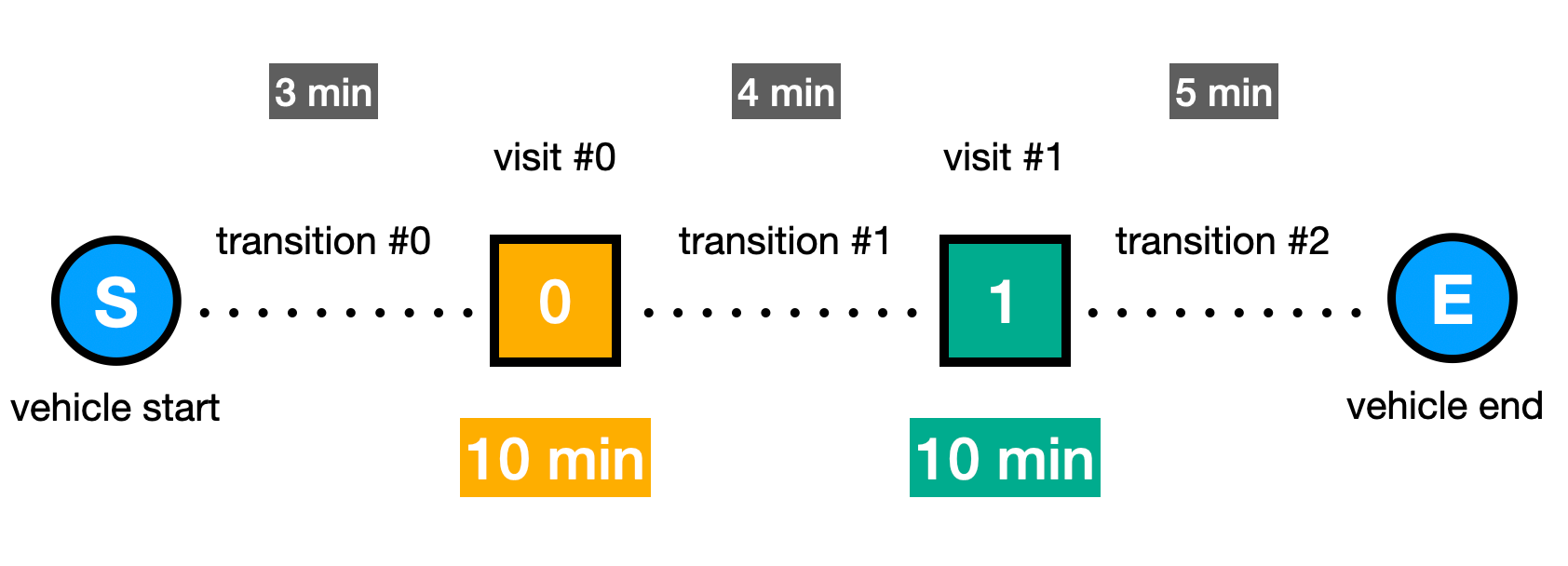
The total time required to complete this two stop route is the sum of all transition travel times and the service times at each stop. In the example above, that’s 3 min (travel) + 10 min (stop) + 4 min (travel) + 10 min (stop) + 5 min (travel) = 32 min.
Modeling parking time for multi-stop deliveries at the same location
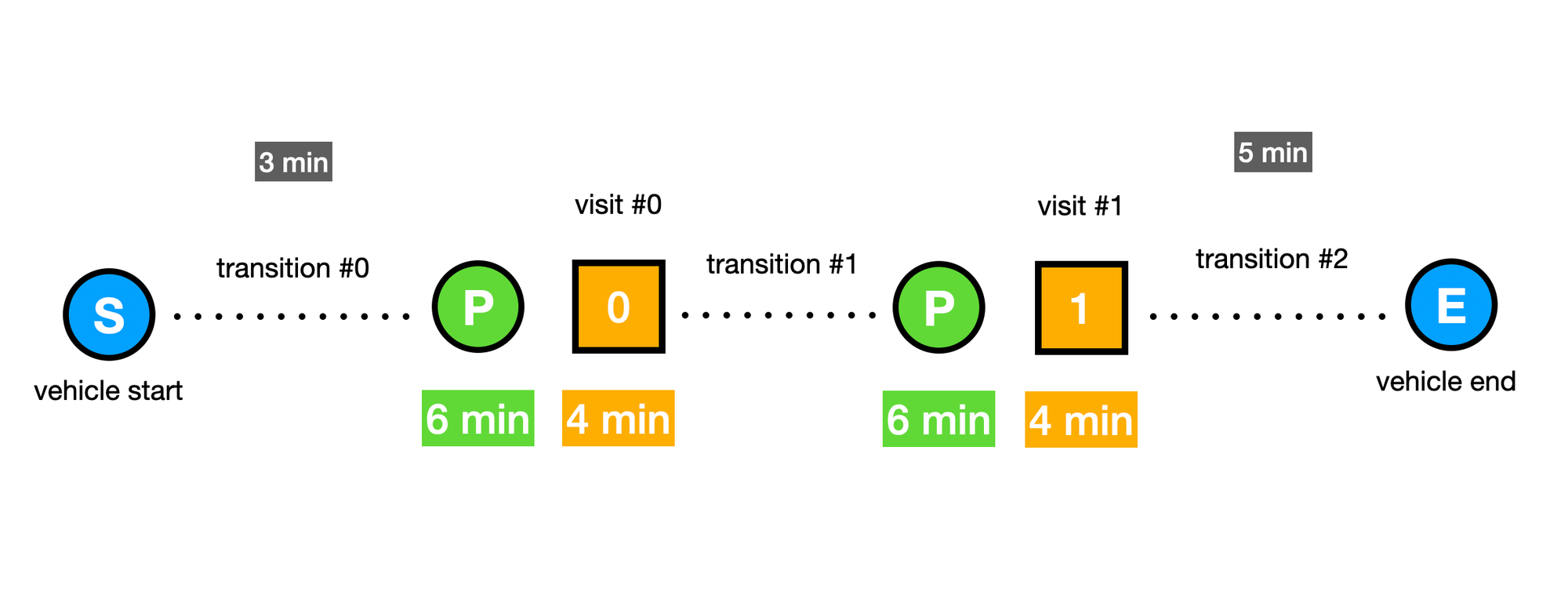
The 10 minute service time assigned to each stop typically includes both the time spent parking and the time spent making the delivery. However, if a driver has two stops within the same building, it shouldn't take 20 minutes total - parking only needs to happen once. To solve this in GMPRO, we first separate the delivery time from the parking time. For example, we might allocate 6 minutes for parking and 4 minutes for the actual service at each stop.
Next, for each unique parking spot in the optimization, we assign a distinct tag to the relevant shipment objects. This tag should be a unique string not used elsewhere in the model. For example, if both visits are to a building at 1074 Jefferson Avenue, West Vancouver, you could tag each associated shipment with "1074-jefferson-ave" like so:
{
    "shipments": [
        {
            "deliveries": [
                {
                    "arrivalLocation": {
                        "latitude": 49.2545595,
                        "longitude": -123.1096174
                    },
                    "duration": "600s",
                    "timeWindows": [
                        {
                            "startTime": "2024-07-08T16:00:00Z",
                            "endTime": "2024-07-08T18:00:00Z"
                        }
                    ]
                }
            ],
            "loadDemands": {
                "weight": {
                    "amount": "1"
                }
            },
            "label": "1074-jefferson-ave"
        }
    ]
}
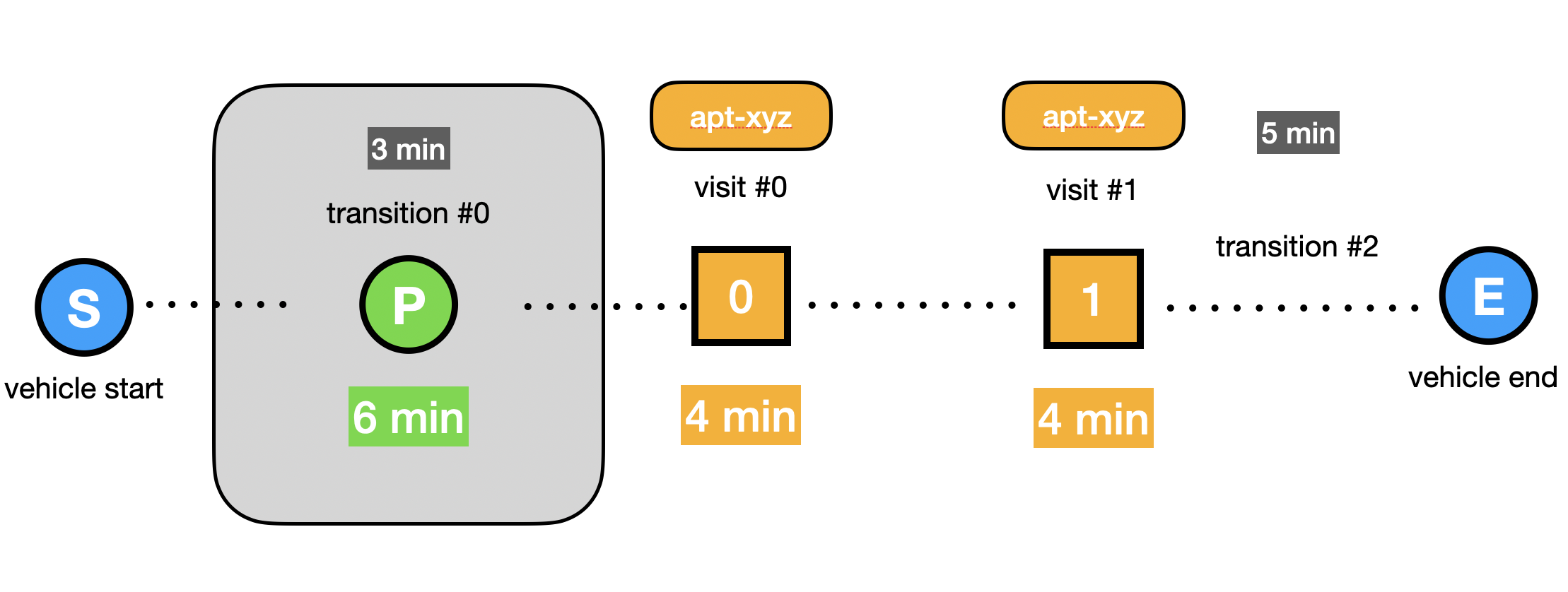
Next, we use the transition attributes object in model to add a 360s (6 min) parking delay to any transition that leads to a visit tagged with "1074-jefferson-ave-parking", unless the transition originates from another visit with the same tag. In other words, if the driver is already delivering within the same building, the solver should not add additional parking time.
{
    "transition_attributes": [
        {
            "excluded_src_tag": "1074-jefferson-ave",
            "dst_tag": "1074-jefferson-ave",
            "delay": "360s"
        }
    ]
}
When passed to GMPRO, the additional parking time of 360s (6 min) shows up in the response as a delayDuration in the relevant transitions object.
{
    "transitions": [
        {
            "travelDuration": "808s",
            "travelDistanceMeters": 13112,
            "delayDuration": "360s",
            "waitDuration": "0s",
            "totalDuration": "1168s",
            "startTime": "2024-07-08T16:00:00Z",
            "vehicleLoads": {
                "weight": {
                    "amount": "6"
                }
            }
        }
    ]
}
When viewed as a timeline, you’ll notice that any transition leading to visits with the same tag do not include additional parking time i.e. "park once, deliver multiple".
GMPRO squashed durations worked example
Let's put everything together. Here's a sample GMPRO JSON input with squashed durations enabled for all shipments being delivered to 1074 Jefferson Avenue.
Input
{
    "model": {
        "shipments": [
            {
                "deliveries": [
                    {
                        "arrivalLocation": {
                            "latitude": 49.2545595,
                            "longitude": -123.1096174
                        },
                        "duration": "600s",
                        "timeWindows": [
                            {
                                "startTime": "2024-07-08T16:00:00Z",
                                "endTime": "2024-07-08T18:00:00Z"
                            }
                        ]
                    }
                ],
                "loadDemands": {
                    "weight": {
                        "amount": "1"
                    }
                },
                "label": "yvr123"
            },
            {
                "deliveries": [
                    {
                        "arrivalLocation": {
                            "latitude": 49.313724,
                            "longitude": -123.0514561
                        },
                        "duration": "600s",
                        "timeWindows": [
                            {
                                "startTime": "2024-07-08T16:00:00Z",
                                "endTime": "2024-07-08T18:00:00Z"
                            }
                        ]
                    }
                ],
                "loadDemands": {
                    "weight": {
                        "amount": "1"
                    }
                },
                "label": "yvr789"
            },
            {
                "deliveries": [
                    {
                        "arrivalLocation": {
                            "latitude": 49.343481,
                            "longitude": -123.0863414
                        },
                        "duration": "600s",
                        "timeWindows": [
                            {
                                "startTime": "2024-07-08T16:00:00Z",
                                "endTime": "2024-07-08T18:00:00Z"
                            }
                        ]
                    }
                ],
                "loadDemands": {
                    "weight": {
                        "amount": "1"
                    }
                },
                "label": "yvr987"
            },
            {
                "deliveries": [
                    {
                        "arrivalLocation": {
                            "latitude": 49.3352081,
                            "longitude": -123.1453979
                        },
                        "duration": "240s",
                        "timeWindows": [
                            {
                                "startTime": "2024-07-08T16:00:00Z",
                                "endTime": "2024-07-08T18:00:00Z"
                            }
                        ],
                        "tags": ["1074-jefferson-ave"]
                    }
                ],
                "loadDemands": {
                    "weight": {
                        "amount": "1"
                    }
                },
                "label": "yvr654-a"
            },
            {
                "deliveries": [
                    {
                        "arrivalLocation": {
                            "latitude": 49.3352081,
                            "longitude": -123.1453979
                        },
                        "duration": "240s",
                        "timeWindows": [
                            {
                                "startTime": "2024-07-08T16:00:00Z",
                                "endTime": "2024-07-08T18:00:00Z"
                            }
                        ],
                        "tags": ["1074-jefferson-ave"]
                    }
                ],
                "loadDemands": {
                    "weight": {
                        "amount": "1"
                    }
                },
                "label": "yvr654-b"
            },
            {
                "deliveries": [
                    {
                        "arrivalLocation": {
                            "latitude": 49.3352081,
                            "longitude": -123.1453979
                        },
                        "duration": "240s",
                        "timeWindows": [
                            {
                                "startTime": "2024-07-08T16:00:00Z",
                                "endTime": "2024-07-08T18:00:00Z"
                            }
                        ],
                        "tags": ["1074-jefferson-ave"]
                    }
                ],
                "loadDemands": {
                    "weight": {
                        "amount": "1"
                    }
                },
                "label": "yvr654-c"
            }
        ],
        "vehicles": [
            {
                "startLocation": {
                    "latitude": 49.375757,
                    "longitude": -123.2739673
                },
                "loadLimits": {
                    "weight": {
                        "maxLoad": 10
                    }
                },
                "startTimeWindows": [
                    {
                        "startTime": "2024-07-08T16:00:00Z"
                    }
                ],
                "endTimeWindows": [
                    {
                        "endTime": "2024-07-08T18:00:00Z"
                    }
                ],
                "label": "mark-yvr",
                "costPerKilometer": 1
            }
        ],
        "transition_attributes": [
            {
              "excluded_src_tag": "1074-jefferson-ave",
              "dst_tag": "1074-jefferson-ave",
              "delay": "360s"
            }
        ],
        "globalStartTime": "2024-07-08T07:00:00Z",
        "globalEndTime": "2024-07-09T06:59:00Z"
    },
    "populatePolylines": true
}
And here's the response (note the 360s delayDuration on the first transition):
Output
{
    "routes": [
        {
            "vehicleLabel": "mark-yvr",
            "vehicleStartTime": "2024-07-08T16:00:00Z",
            "vehicleEndTime": "2024-07-08T17:45:11Z",
            "visits": [
                {
                    "shipmentIndex": 5,
                    "startTime": "2024-07-08T16:19:28Z",
                    "detour": "0s",
                    "shipmentLabel": "yvr654-c",
                    "loadDemands": {
                        "weight": {
                            "amount": "-1"
                        }
                    }
                },
                {
                    "shipmentIndex": 4,
                    "startTime": "2024-07-08T16:23:28Z",
                    "detour": "240s",
                    "shipmentLabel": "yvr654-b",
                    "loadDemands": {
                        "weight": {
                            "amount": "-1"
                        }
                    }
                },
                {
                    "shipmentIndex": 3,
                    "startTime": "2024-07-08T16:27:28Z",
                    "detour": "480s",
                    "shipmentLabel": "yvr654-a",
                    "loadDemands": {
                        "weight": {
                            "amount": "-1"
                        }
                    }
                },
                {
                    "shipmentIndex": 2,
                    "startTime": "2024-07-08T16:40:33Z",
                    "detour": "1416s",
                    "shipmentLabel": "yvr987",
                    "loadDemands": {
                        "weight": {
                            "amount": "-1"
                        }
                    }
                },
                {
                    "shipmentIndex": 1,
                    "startTime": "2024-07-08T17:00:02Z",
                    "detour": "2439s",
                    "shipmentLabel": "yvr789",
                    "loadDemands": {
                        "weight": {
                            "amount": "-1"
                        }
                    }
                },
                {
                    "startTime": "2024-07-08T17:35:11Z",
                    "detour": "3543s",
                    "shipmentLabel": "yvr123",
                    "loadDemands": {
                        "weight": {
                            "amount": "-1"
                        }
                    }
                }
            ],
            "transitions": [
                {
                    "travelDuration": "808s",
                    "travelDistanceMeters": 13112,
                    "delayDuration": "360s",
                    "waitDuration": "0s",
                    "totalDuration": "1168s",
                    "startTime": "2024-07-08T16:00:00Z",
                    "vehicleLoads": {
                        "weight": {
                            "amount": "6"
                        }
                    }
                },
                {
                    "travelDuration": "0s",
                    "waitDuration": "0s",
                    "totalDuration": "0s",
                    "startTime": "2024-07-08T16:23:28Z",
                    "vehicleLoads": {
                        "weight": {
                            "amount": "5"
                        }
                    }
                },
                {
                    "travelDuration": "0s",
                    "waitDuration": "0s",
                    "totalDuration": "0s",
                    "startTime": "2024-07-08T16:27:28Z",
                    "vehicleLoads": {
                        "weight": {
                            "amount": "4"
                        }
                    }
                },
                {
                    "travelDuration": "545s",
                    "travelDistanceMeters": 6329,
                    "waitDuration": "0s",
                    "totalDuration": "545s",
                    "startTime": "2024-07-08T16:31:28Z",
                    "vehicleLoads": {
                        "weight": {
                            "amount": "3"
                        }
                    }
                },
                {
                    "travelDuration": "569s",
                    "travelDistanceMeters": 7066,
                    "waitDuration": "0s",
                    "totalDuration": "569s",
                    "startTime": "2024-07-08T16:50:33Z",
                    "vehicleLoads": {
                        "weight": {
                            "amount": "2"
                        }
                    }
                },
                {
                    "travelDuration": "1509s",
                    "travelDistanceMeters": 14500,
                    "waitDuration": "0s",
                    "totalDuration": "1509s",
                    "startTime": "2024-07-08T17:10:02Z",
                    "vehicleLoads": {
                        "weight": {
                            "amount": "1"
                        }
                    }
                },
                {
                    "travelDuration": "0s",
                    "waitDuration": "0s",
                    "totalDuration": "0s",
                    "startTime": "2024-07-08T17:45:11Z",
                    "vehicleLoads": {
                        "weight": {}
                    }
                }
            ],
            "routePolyline": {
                "points": "spjlHh{koV^`@HFHBB?D@JBDDB@ZLPaF@e@B[Du@BYBI@ADGDCF?@?L@TD`@@j@AP?H?RUN@J@LBNDLDRJHDTTLLP`"
            },
            "metrics": {
                "performedShipmentCount": 6,
                "travelDuration": "3431s",
                "waitDuration": "0s",
                "delayDuration": "360s",
                "breakDuration": "0s",
                "visitDuration": "2520s",
                "totalDuration": "6311s",
                "travelDistanceMeters": 41007,
                "maxLoads": {
                    "weight": {
                        "amount": "6"
                    }
                },
                "performedMandatoryShipmentCount": 6
            },
            "routeCosts": {
                "model.vehicles.cost_per_kilometer": 41.007
            },
            "routeTotalCost": 41.007,
            "vehicleFullness": {
                "maxFullness": 0.87652777777777779,
                "maxLoad": 0.6,
                "activeSpan": 0.87652777777777779
            }
        }
    ],
    "metrics": {
        "aggregatedRouteMetrics": {
            "performedShipmentCount": 6,
            "travelDuration": "3431s",
            "waitDuration": "0s",
            "delayDuration": "360s",
            "breakDuration": "0s",
            "visitDuration": "2520s",
            "totalDuration": "6311s",
            "travelDistanceMeters": 41007,
            "maxLoads": {
                "weight": {
                    "amount": "6"
                }
            },
            "performedMandatoryShipmentCount": 6
        },
        "usedVehicleCount": 1,
        "earliestVehicleStartTime": "2024-07-08T16:00:00Z",
        "latestVehicleEndTime": "2024-07-08T17:45:11Z",
        "totalCost": 41.007,
        "costs": {
            "model.vehicles.cost_per_kilometer": 41.007
        }
    }
}
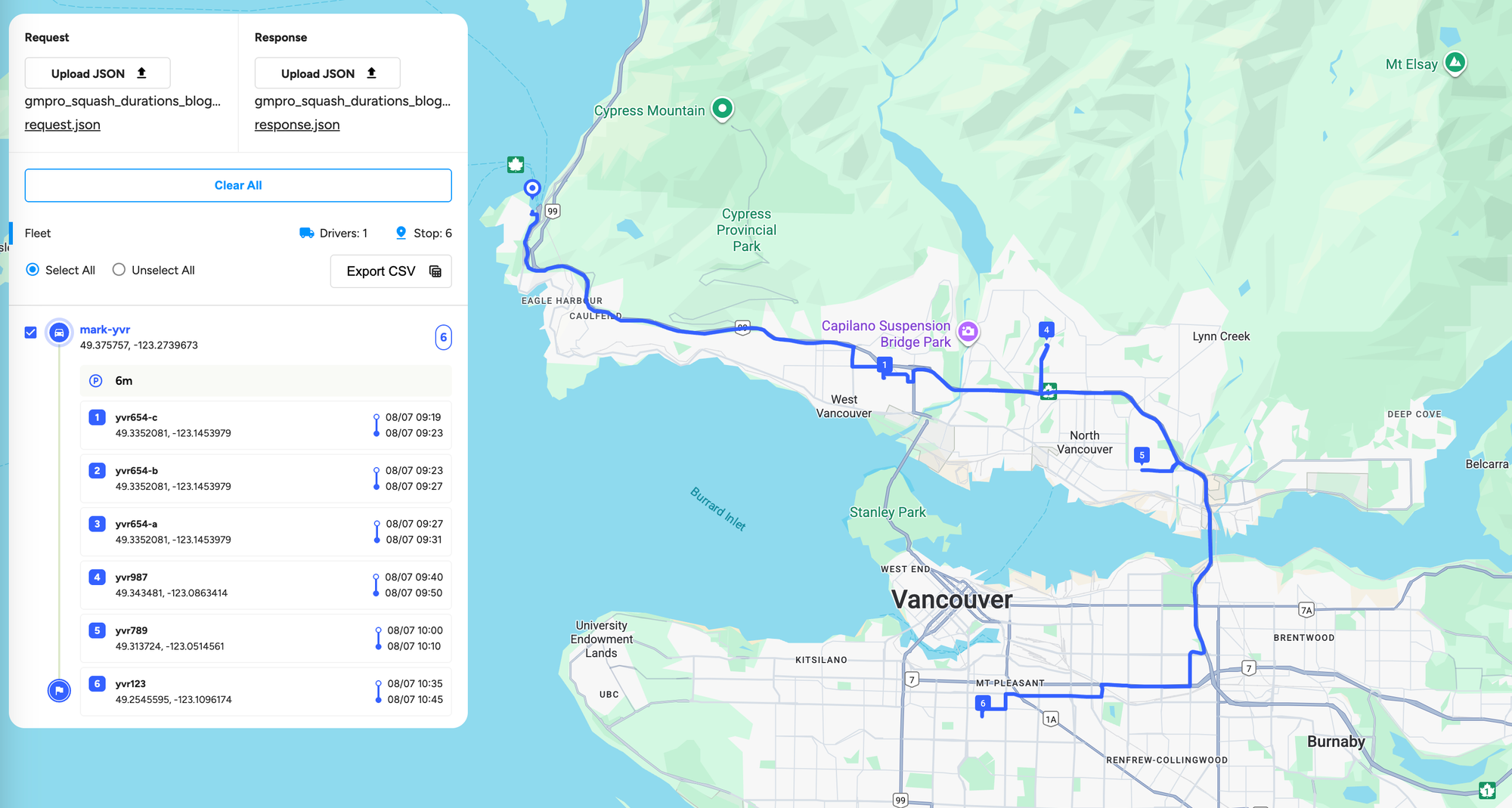
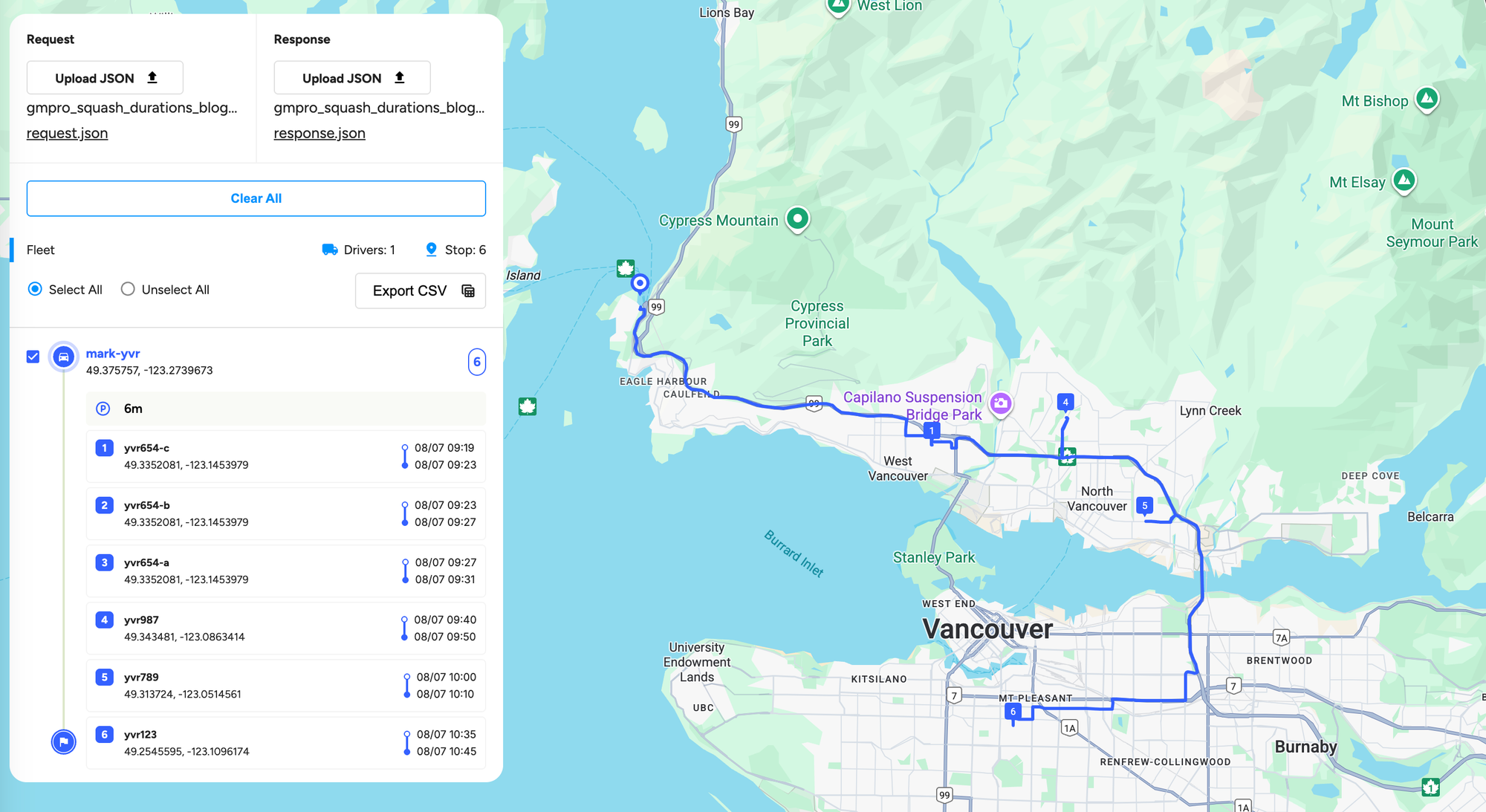
If you upload these files to my GMPRO Viewer, you'll see the parking time displayed with a small 🅿️ icon.
Is there a better way to handle parking and squashed durations?
There's much to like about how GMPRO handles squashed durations. It works as advertised and offers significant flexibility. For example, you can apply squashed durations selectively to specific locations, or customize the parking time based on each location. However, this approach requires you to preprocess your shipment list by grouping deliveries that belong to the same building or apartment complex and assigning a unique tag to each group. You’ll then need to define transition attributes for each of these tags.
A more elegant way of handling parking is used by Routific. In their route optimization API, implementing squashed durations is as easy as adding a single line, "squash_durations": 1, to the options payload attached to each optimization request. This squashes the durations of each subsequent delivery at the same address.
{
    "options": {
        "squash_durations": 1
    }
}
Let's say you have 6 stops at the same address and each has a service time of 10 minutes. If you set squash_durations to 1, it will squash it to 1 minute, so the total duration for the 6 stops would be 10 min + 1 min+ 1 min + 1 min + 1 min + 1 min = 15 min.
👋 As always, if you have any questions or suggestions for me, please reach out or say hello on LinkedIn.